FastAPI 文件配置與 Metadata
FastAPI 最棒的功能之一就是自動產生的 API 文件。你可以透過設定 FastAPI 應用程式的參數,來豐富這些文件的內容,使其更專業。
基本宣告
在建立 FastAPI 物件時,你可以傳入標題、描述和版本號:
from fastapi import FastAPI

app = FastAPI(
    title="My Super Project",
    description="This is a very fancy project, with auto docs for the API and everything",
    version="2.5.0",
)

@app.get("/items/")
async def read_items():
    return [{"name": "Foo"}]
這些資訊會直接顯示在 /docs (Swagger UI) 和 /redoc (ReDoc) 的最上方。
描述支援 Markdown
description 欄位支援 Markdown 語法,所以你可以放入多行文字、列表、甚至是圖片。
description = """
MyApp API helps you do awesome stuff. 🚀

## Items

You can **read items**.

## Users

You can:

* **Create users** (_not implemented_).
* **Read users** (_not implemented_).
"""

app = FastAPI(
    title="MyApp",
    description=description,
    version="0.0.1",
    contact={
        "name": "Deadpoolio the Amazing",
        "url": "http://x-force.example.com/contact/",
        "email": "dp@x-force.example.com",
    },
    license_info={
        "name": "Apache 2.0",
        "url": "https://www.apache.org/licenses/LICENSE-2.0.html",
    },
)
Tags Metadata (標籤說明)
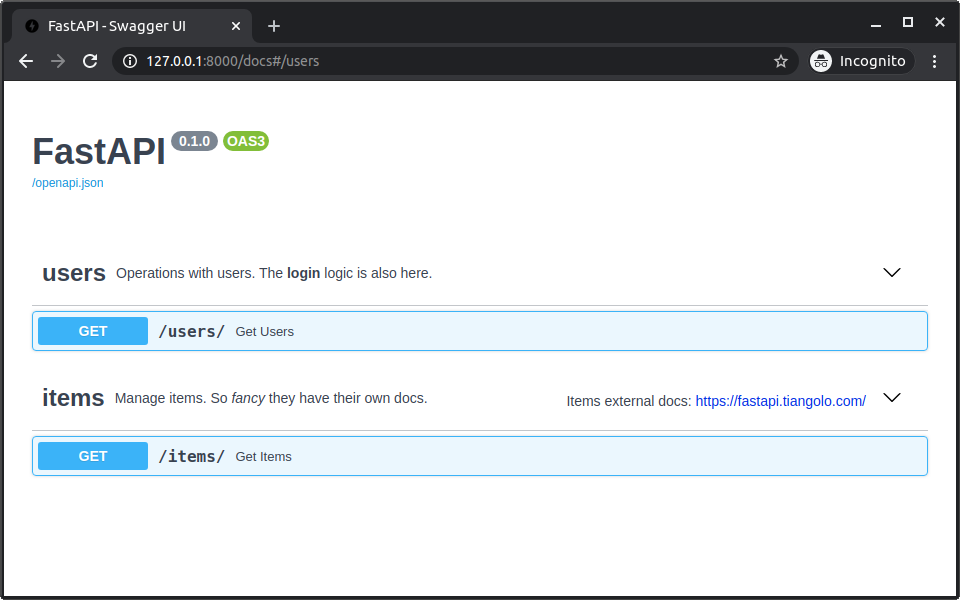
我們在路徑操作中使用的 tags=["users"] 可以將 API 分組。
你可以透過 openapi_tags 參數來為這些標籤添加額外的說明文件。
tags_metadata = [
    {
        "name": "users",
        "description": "Operations with users. The **login** logic is also here.",
    },
    {
        "name": "items",
        "description": "Manage items. So _fancy_ they have their own docs.",
        "externalDocs": {
            "description": "Items external docs",
            "url": "https://fastapi.tiangolo.com/",
        },
    },
]

app = FastAPI(openapi_tags=tags_metadata)

@app.get("/users/", tags=["users"])
async def get_users():
    return [{"name": "Harry"}, {"name": "Ron"}]

@app.get("/items/", tags=["items"])
async def get_items():
    return [{"name": "Wand"}]
這樣在 Swagger UI 中,users 和 items 分組的標題下方就會顯示你設定的詳細說明。
設定 Docs URL / 關閉 FastAPI 文件
如果你想更改文件路徑 (預設是 /docs 和 /redoc),或者想關閉它們:
app = FastAPI(
    docs_url="/documentation",  # 改為 /documentation
    redoc_url=None,             # 關閉 ReDoc
)
總結
- 在
FastAPI()中設定title,description,version來豐富文件頭部資訊。 description支援 Markdown。- 使用
openapi_tags為你的 API 分組標籤添加詳細說明。 - 可以自訂或關閉
/docsURL。